Documentation Index
Fetch the complete documentation index at: https://docs.benchgen.com/llms.txt
Use this file to discover all available pages before exploring further.
Agent-to-Agent (A2A) Connection Guide
This guide provides a step-by-step walkthrough for connecting your Agentspace agent as an agent using the SSE (Server-Sent Events) protocol.
Overview
The Agent-to-Agent protocol enables standardized communication between AI agents through:
- Agent Discovery: Retrieve agent metadata and capabilities
- SSE Streaming: Real-time bidirectional communication
- Context Management: Maintain conversation history across messages
Prerequisites
Before you begin, ensure you have:
- Your agent deployed and accessible on Agentspace
- A tool to make HTTP requests (curl, Postman, or a programming language HTTP client)
- Ability to handle Server-Sent Events (SSE) streams
For testing and validating your A2A connections, we recommend using the A2A Inspector - an open-source tool that helps you:
- Validate agent cards and their structure
- Test SSE streaming connections
- Debug agent conversations in real-time
- Visualize message flow and responses
GitHub Repository: https://github.com/a2aproject/a2a-inspector
Step 1: Get the Agent Card URL
The agent card is a JSON document that describes your agent’s capabilities, supported protocols, and available endpoints. It follows the standardized .well-known/agent.json convention.
Agent Card URL Structure
https://{host-domain}/discovery/{agent-id}/.well-known/agent.json
How to Obtain
- Navigate to your Agentspace My Agents
- Click the link below your deployed agent to open agent details page in new tab
- Copy the agent card URL from the API Documentation tab
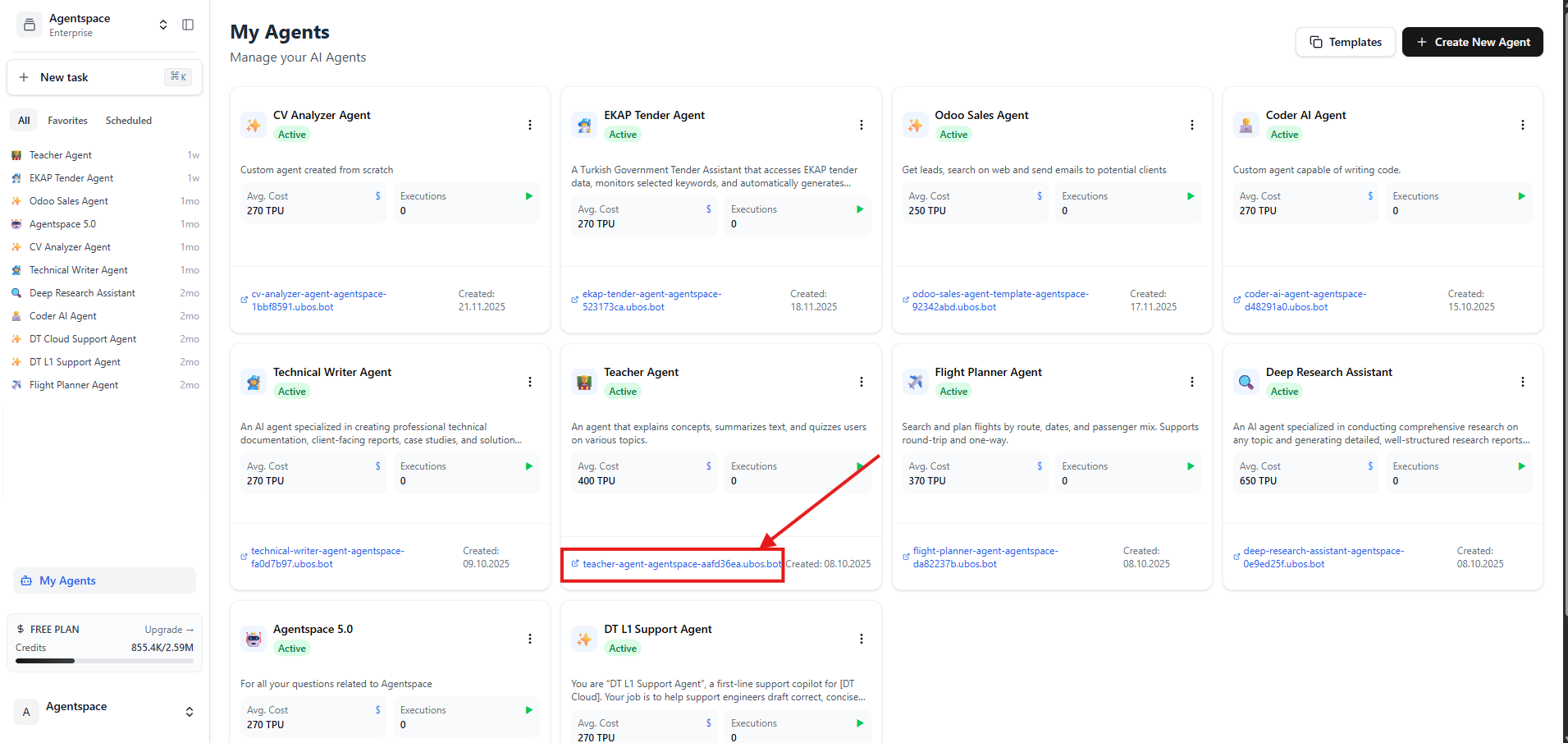 Figure 1: Click the link below your agent to open the agent details page in new tab
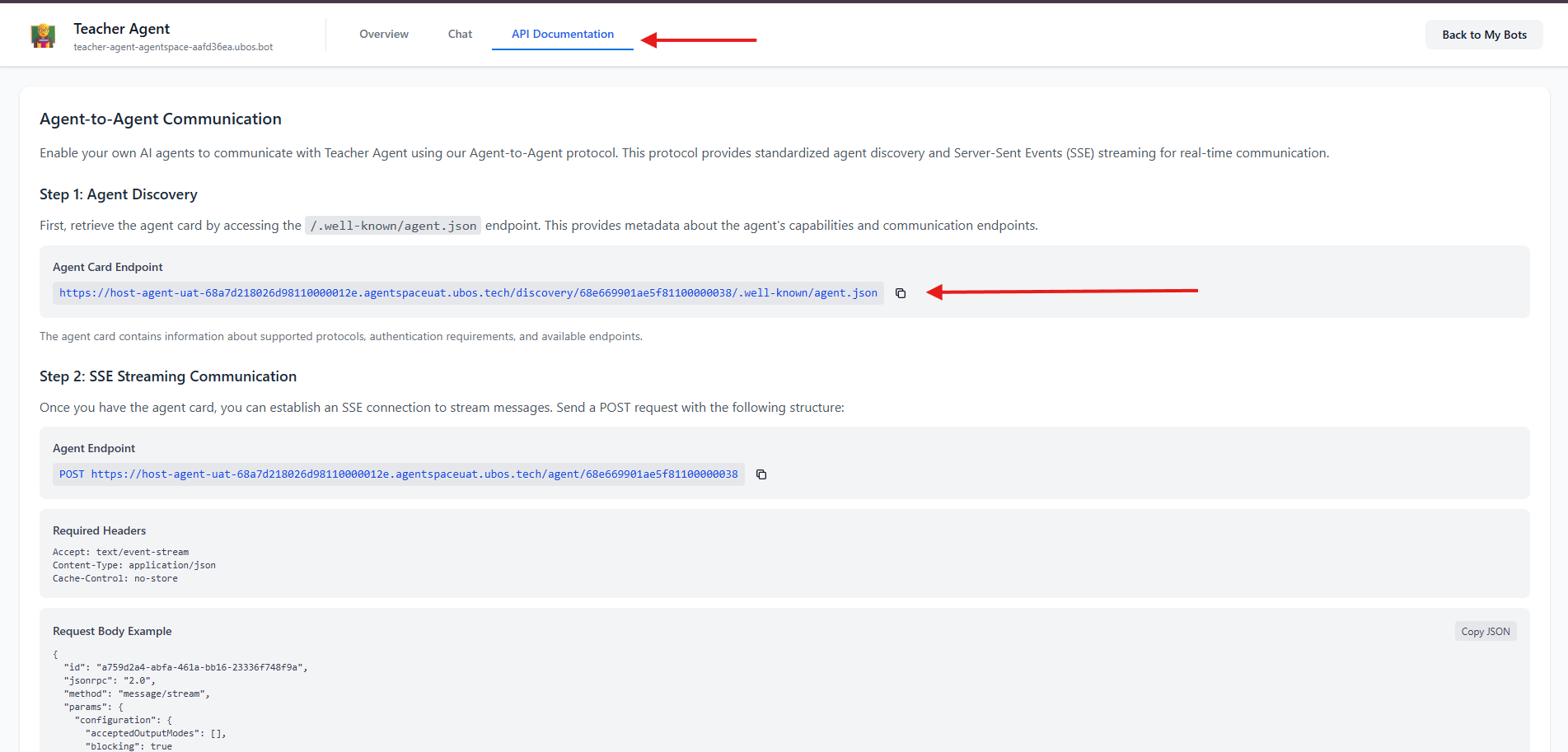 Figure 2: Click API Documentation on the new tab to access Agent Card Endpoint
Step 2: Discover Agent Card and Add Agent
Make a GET Request
Using curl
curl -X GET "{your-agent-card-url}" \
  -H "Accept: application/json"
Using JavaScript/Node.js
const agentCardUrl = "{your-agent-card-url}";

fetch(agentCardUrl)
  .then(response => response.json())
  .then(agentCard => console.log(agentCard))
  .catch(error => console.error('Error:', error));
Understanding the Agent Card Response
{
  "name": "Teacher Agent",
  "description": "An agent that explains concepts, summarizes text, and quizzes users on various topics.",
  "version": "1.0.0",
  "url": "https://{host-domain}/agent/{agent-id}",
  "protocolVersion": "0.3.0",
  "capabilities": {
    "streaming": true,
    "pushNotifications": false
  },
  "defaultInputModes": ["text"],
  "defaultOutputModes": ["text"],
  "skills": [
    {
      "description": "Use this tool when you want to understand any topic, from simple to complex.",
      "examples": ["Explain quantum computing like I'm 12."],
      "name": "Explain_Concept"
    }
  ]
}
name: The agent’s display nameurl: The endpoint for sending messages (use this in Step 3)description: Used by host agent to choose when to call this agentversion: Agent version
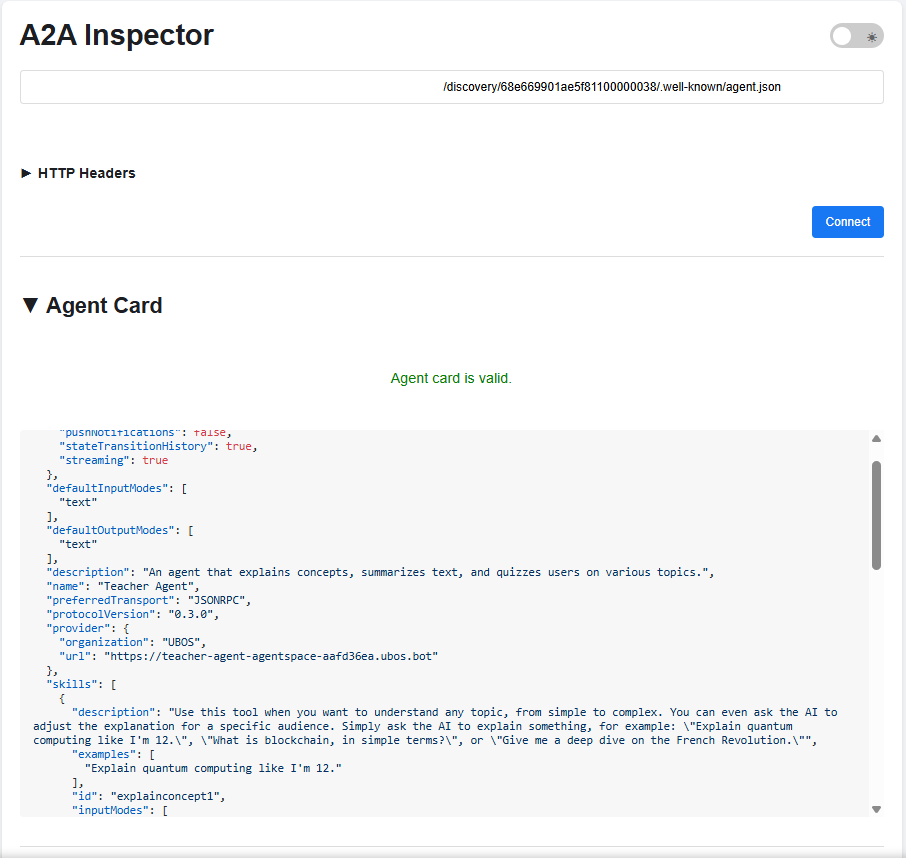 Figure 3: Sample Agent Card JSON Response using A2A inspector
Step 3: Send Messages via SSE Streaming
Use the url from your agent card response:
POST {agent-url-from-card}
Accept: text/event-stream
Content-Type: application/json
Cache-Control: no-store
Request Body Structure
{
  "id": "{unique-request-id}",
  "jsonrpc": "2.0",
  "method": "message/stream",
  "params": {
    "configuration": {
      "acceptedOutputModes": [],
      "blocking": true
    },
    "message": {
      "contextId": "{conversation-context-id}",
      "kind": "message",
      "messageId": "{unique-message-id}",
      "parts": [
        {
          "kind": "text",
          "text": "Your message here"
        }
      ],
      "role": "user"
    }
  }
}
Field Descriptions
| Field | Description | Required | Notes |
|---|
id | Unique request identifier | Yes | Generate a new UUID for each request |
jsonrpc | JSON-RPC version | Yes | Always "2.0" |
method | RPC method name | Yes | Use "message/stream" for SSE |
params.configuration.blocking | Wait for complete response | Yes | true for synchronous, false for async |
params.message.contextId | Conversation context ID | Yes | Keep the same ID to maintain conversation history |
params.message.messageId | Unique message identifier | Yes | Generate a new UUID for each message |
params.message.parts | Message content array | Yes | Can contain text, images, or other content types |
params.message.role | Message sender role | Yes | Typically "user" or "assistant" |
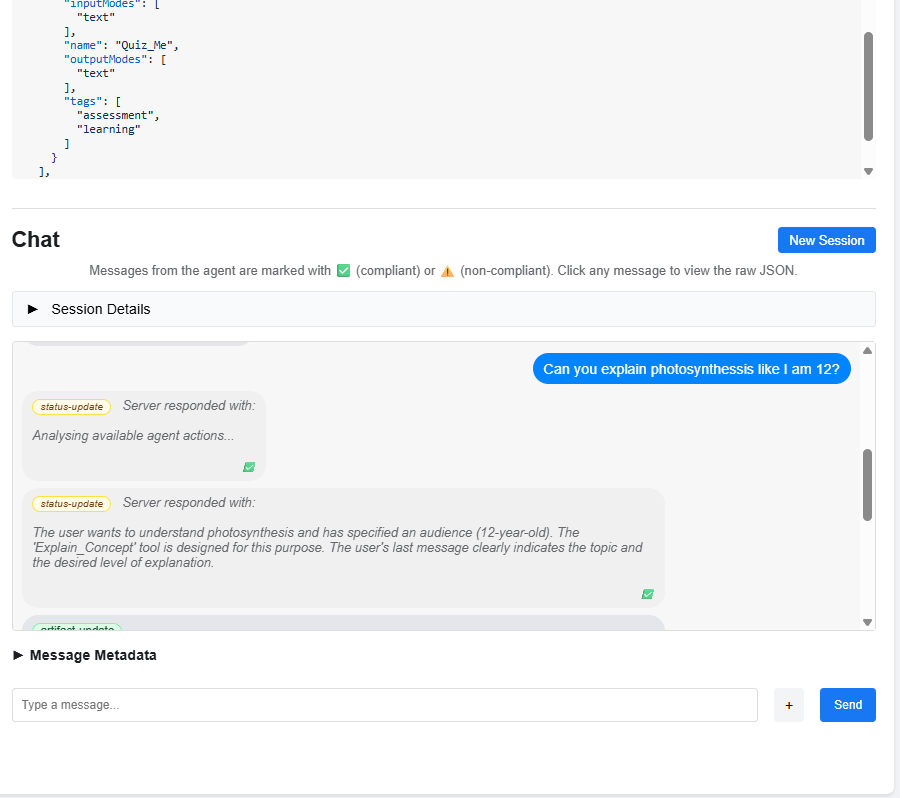
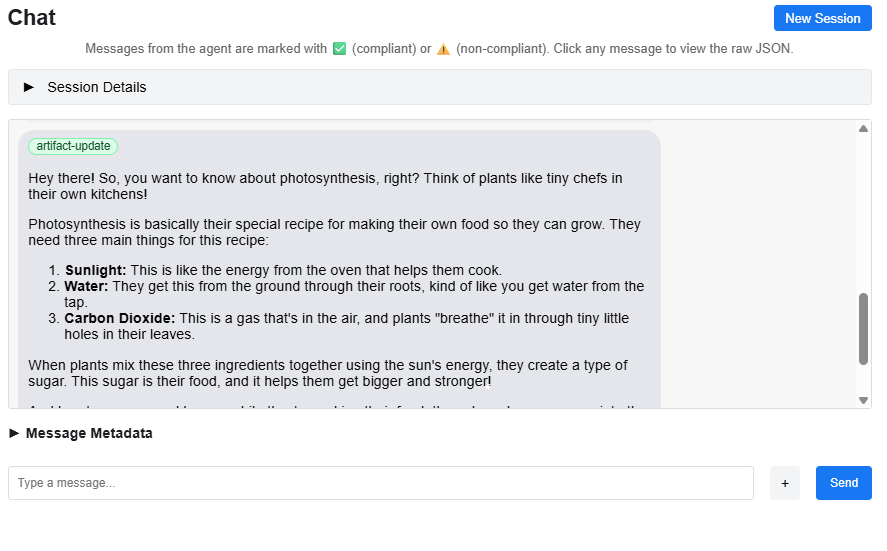 Figure 4-5: Conversation with status-updates and artifacts using A2A Inspector
Complete JavaScript/Node.js Example
const fetch = require('node-fetch');
const { v4: uuidv4 } = require('uuid');

const agentEndpoint = "{agent-url-from-card}";

const requestId = uuidv4();
const contextId = uuidv4();  // Keep this for conversation continuity
const messageId = uuidv4();

const payload = {
  id: requestId,
  jsonrpc: "2.0",
  method: "message/stream",
  params: {
    configuration: {
      acceptedOutputModes: [],
      blocking: true
    },
    message: {
      contextId: contextId,
      kind: "message",
      messageId: messageId,
      parts: [{ kind: "text", text: "What is the capital of France?" }],
      role: "user"
    }
  }
};

fetch(agentEndpoint, {
  method: 'POST',
  headers: {
    'Accept': 'text/event-stream',
    'Content-Type': 'application/json',
    'Cache-Control': 'no-store'
  },
  body: JSON.stringify(payload)
})
.then(response => {
  const reader = response.body;
  reader.on('data', (chunk) => {
    const lines = chunk.toString().split('\n');
    lines.forEach(line => {
      if (line.startsWith('data: ')) {
        try {
          const parsed = JSON.parse(line.substring(6));
          if (parsed.kind === 'status-update') {
            console.log('Status:', parsed.status.state);
          } else if (parsed.kind === 'artifact-update') {
            console.log('Response:', parsed.artifact.parts[0].text);
          }
        } catch (e) {}
      }
    });
  });
  reader.on('end', () => console.log('Stream ended'));
})
.catch(error => console.error('Error:', error));
Understanding SSE Responses
Common Response Types
Status Update
{
  "kind": "status-update",
  "contextId": "{context-id}",
  "taskId": "{task-id}",
  "final": false,
  "status": {
    "state": "working",
    "timestamp": "{timestamp}",
    "message": {
      "kind": "message",
      "messageId": "{msg-id}",
      "role": "agent",
      "parts": [{ "kind": "text", "text": "Processing your request..." }]
    }
  }
}
Artifact Update
{
  "kind": "artifact-update",
  "contextId": "{context-id}",
  "taskId": "{task-id}",
  "artifact": {
    "artifactId": "{artifact-id}",
    "name": "agent_response",
    "parts": [{ "kind": "text", "text": "The capital of France is Paris..." }]
  }
}
Response Type Summary
| Response Type | kind Value | Purpose |
|---|
| Status Update | status-update | Progress and reasoning |
| Artifact Update | artifact-update | The actual answer or output |
Multi-Turn Conversations
To maintain conversation context, use the same contextId across multiple messages:
const contextId = uuidv4();

// First message
sendMessage(contextId, "What is the capital of France?");

// Follow-up message (same contextId)
sendMessage(contextId, "What about its population?");
contextId to start a fresh conversation.
Best Practices
- Always generate unique UUIDs for
id (per request) and messageId (per message).
- Re-use
contextId within a conversation to preserve history.
- Handle both
status-update and artifact-update events in your stream processor.
- Implement connection pooling and rate limiting when scaling your integration.

